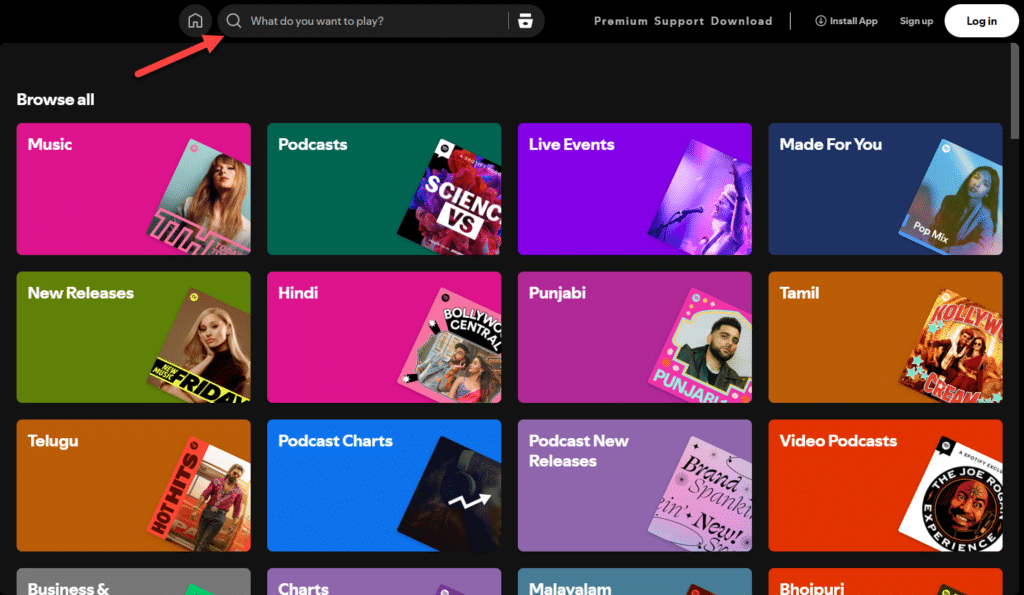
Have you ever been in a situation where you would like to listen to your favorite Spotify tracks offline, but the internet connection won’t cooperate? Everyone who uses Spotify knows this problem well. Offline listening is a lifesaver whether you’re traveling, in a remote area, or just trying to save on data.
The million-dollar question is, where are those downloaded Spotify songs stored on your Windows device? You’re not alone if you’ve been scratching your head about this! In truth, Spotify does not make it easy for users to access their downloaded songs directly on Windows.
So, what’s the solution? Meet Spoty Downloader — the game changer for downloading your favorite music, saving it in MP3 format, and playing it anywhere, anytime, without a hitch. But, without an internet connection, let’s dive in and see how you can take control of your music library!
Table of Contents
Understanding Spotify’s Downloading System
If you’ve hit the download button on Spotify, you’ve probably wondered where those songs go. Let’s clear up some confusion. Streaming music on Spotify is just listening to it on the fly, using your internet connection. If you’re downloading songs, you’re saving them for offline use, so to speak. Sounds great, right?
The twist here is that the downloaded tracks aren’t saved as the usual MP3 or WAV type of files that you can freely move or play on any device. Spotify’s downloads are encrypted in a unique format that is only for the Spotify app. As a result, even though you have the tracks on your device, they are locked down and can’t be accessed or played on other music players.
If you’re thinking about copying them to another device or playing them outside Spotify, sorry—you’re out of luck. Pretty limiting, right? However, you can get around this! If you want to get those Spotify songs in MP3 format, you can use Spoty Downloader to store them as regular music files and play them anytime, anywhere, without the Spotify app. So let’s see how Spoty Downloader makes all of this possible!
How to Use Spoty Downloader to Save Spotify Songs on Windows
Are you tired of Spotify’s restrictions on offline listening? Finally, you can break free with Spoty Downloader! This fantastic tool lets you download Spotify songs and playlists as MP3 files without encryption limitations. In addition, you’ll be free to listen to your favorite tracks on any device, at any time, anywhere. Here are the steps to download your favorite Spotify music with spoty downloader.
Step 1: Search for your Favorite Track or Playlist on Spotify

The first step is simple! Open Spotify and search for the song, playlist, or album you want to download. When you have found the perfect track, click the Share button to prepare for the next step.
Step 2: Copy the Spotify Link

Once you’ve picked your track, click the Copy Link from the share options. It will generate a unique URL to download the song or playlist you want. Clicking a button is as easy as it gets, and now the link is in your clipboard, waiting for action!
Step 3: Paste the Link to Spoty Downloader
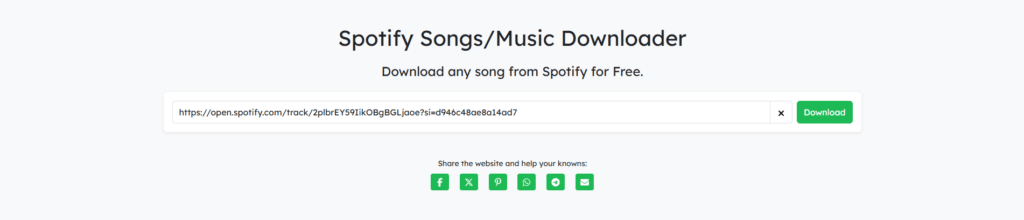
Visit the Spoty Downloader website, and you will see a field waiting for the Spotify link. Paste the copied URL right into this box and hit Download. In this case, your song is ready for download!
Step 4: Start the Download

After link processing, click the Download MP3 button to download track/song now.
Step 5: Enjoy Your Offline Music
After the download process finishes, your MP3 file will automatically be saved to your device’s storage. After opening it, your music player will be ready to play your favorite songs without an internet connection. Regardless of your current location, which includes flying on an aircraft, traveling via your car, or staying inside your home, your music will remain accessible.
Spoty Downloader enables users to access Spotify music without restrictions through their Windows PC and converts it to any device-compatible format. It’s that simple!
Where Do Spoty Downloaders’ Downloaded Spotify Songs Go on Windows?
After using Spoty Downloader to download your Spotify tracks, you might wonder which folder contains these files. You will find all the answers you need here.
The default storage location for MP3 files saved by Spoty Downloader exists in the Downloads folder of your Windows PC. Your fresh music automatically finds the most accessible storage location on this platform. Your files will become accessible through the Downloads folder, where you can listen to them directly or move them to other directories according to your personal preferences.
The great news is that you maintain complete control over your music downloading process. You can modify the download destination whenever you want. Spoty Downloader enables users to pick either a music folder or another directory to store their music files according to their preferences. The application lets you select a desired folder where your MP3 files will automatically appear.
All downloaded files are saved in MP3 format through Spoty Downloader, so you can easily play them on any media player. You need only your regular music player and Spoty Downloader to access your music.
Why Choose Spoty Downloader for Spotify Songs on Windows?
Want a game-changing way to download your Spotify tracks? Welcome! The reasons why Spoty Downloader should be your choice for downloading songs from Spotify are:
Hassle-free, No extra software, and completely free!
Unlike Spotify’s native app, Spoty Downloader gives you freedom from Spotify’s Restrictions: You are allowed to own your Spotify music. The music is locked in an encrypted format and is only available on Spotify’s platform with their app. However, with Spoty Downloader, you can quickly convert Spotify songs into MP3 files that you can play anywhere, anytime.
It’s Free and Simple to Use
Who doesn’t like something free and simple to use? Not only is Spoty Downloader free, but it is also very easy to use. There is no confusing setup, no complicated steps, and it is just a simple process to download songs from Spotify with just a few clicks. Also, no additional software installation is required.
Spoty Downloader gives you complete control over your Spotify MP3 downloads. You choose which playlists, albums, or tracks to save. You can also choose where to store them on your Windows PC.
No Ads, No Interruptions
Enjoy Spotify without any ads or interruptions with Spoty Downloader. With no annoying ads or buffering, you will only have to enjoy pure, uninterrupted music.
In brief, Spoty Downloader is the best free Spotify music downloader! It’s easy to use and efficient and gives you the freedom to listen to your music offline precisely how you want.
Conclusion
Spoty Downloader frees you from the Spotify app, internet connectivity, encryption restrictions, and so on. This free Spotify music downloader allows you to easily download Spotify songs to MP3 format so that you can have them on any device, any place, anytime. So whether you’re on a long flight, hitting the road, or just relaxing at home, your favorite Spotify songs are just a click away.
So, why wait? With Spoty Downloader, you can finally take full control of your music library and enjoy the best freedom in offline listening!
FAQs
What is the location of Spotify songs on Windows using Spoty Downloader?
Spoty Downloader downloads Spotify songs to the default “Downloads” folder or the folder you select and saves the downloaded Spotify songs as MP3 files.
Can I transfer Spotify songs downloaded using Spoty Downloader to other devices?
If you download the songs as MP3 files, you can transfer them to other devices such as smartphones, MP3 players, or external storage.
How do you download Spotify playlists to MP3 using Spoty Downloader?
Paste the playlist link into the Spoty Playlist Downloader input box and press Download. The program will show you the entire playlist’s songs. Click on the Download MP3 button to download any song of your choice.
Is Spoty Downloader safe to use when downloading Spotify songs?
Yes, Spoty Downloader is a safe and trustworthy tool for legally downloading Spotify songs without malware.